post your comment to know what you need about GTA addon, Counter Strike addon or etc from this blog
attention:
if you want download a file, please wait the ads until the loading end, to make a good direct download link

~"Thanks for Your Attention"~
Tampilkan postingan dengan label Internet Tools. Tampilkan semua postingan

Rabu, 09 Maret 2011

Google Chrome 11.0.696.0 / 10.0.648.127 Stable

A browser that combines a minimal design with sophisticated technology

Google Chrome was developed to be a browser that combines a minimal design with sophisticated technology to make the web faster, safer, and easier.

One box for everything
Type in the address bar and get suggestions for both search and web pages.
Thumbnails of your top sites
Access your favorite pages instantly with lightning speed from any new tab.
Shortcuts for your apps
Get desktop shortcuts to launch your favorite web applications easily and quickly.
Here are some key features of "Google Chrome":

· Speed: Fast to launch, fast to load web pages
· Quick to start up from your desktop
· Loads web pages in a snap
· Runs web applications faster than ever

· Simplicity: Designed for efficiency and ease of use
· Search and navigate to web pages from the same box
· Arrange and organize tabs however you wish — quickly and easily
· Get to your favorite websites with just a click, from the thumbnails of your most visited sites in the New Tab page

· Style: Themes to add delight to your browser
· Try Minimalist, Star Gazing, or Google Chrome Artist Themes.

· One box for everything
· New Tab page
· Application shortcuts
· Dynamic tabs
· Crash control
· Incognito mode
· Safe browsing
· Instant bookmarks
· Importing settings
· Simpler downloads

What's New in This Release:

· Updated V8 - 3.2.0.1
· New “cookies and other data” page in tabbed settings (Issue 64154).

DOWNLOAD

Jumat, 11 Februari 2011

Internet Explorer 9 RC Windows 7 32-bit

Internet Explorer 9 is the new edition of Microsoft's hugely popular web browser. Building on the success of previous editions of IE with new features and a new look, Microsoft has high hopes for Internet Explorer 9.
The first thing you'll notice about Internet Explorer 9 is an overhauled interface. Making the most of the transparent graphical style available in Windows 7 and newer editions of Windows Vista, IE 9 looks sleek, smart and simpler than ever before. Like in Google Chrome, the Address bar and Search box have been merged to create a simpler, more seamless user experience.
Among the new features included in Internet Explorer 9 are better integration with the Windows operating system and a seriously beefed-up security system. IE 9 also lets you 'pin' websites to the Superbar and allows you to bookmark your favorite websites as 'applications' in your OS. As for safety, the new Tracking protection and ActiveX filtering features let you block certain sites from tracking your movements online and switch off ActiveX elements on a per-site basis, respectively. The new Performance Advisor add-on identifies add-ons that are slowing Internet Explorer down (a feature badly needed in Mozilla Firefox).
Internet Explorer 9 also offers improved speed and performance, as well as better compliance with web standards and new technologies. IE 9 features decent support for HTML 5 (the new generation of media-rich websites use this language), and now finishes the Acid 3 test with a near-perfect 95/100. New features like hang recovery and InPrivate Filtering provide Internet Explorer a stabler and more secure web experience than most other browsers.
In all, the latest version of Windows Internet Explorer 9 is faster and prettier than its predecessors - and really throws down the gauntlet to its competitors. Watch out: the browser wars just got exciting again.
Pros
 
  • Faster multicore JavaScript engine
  • Support for HTML5 and CSS3
  • Very well integrated with the system
  • Sleek interface
  • Improved security features
Cons
  • Basic HTML5 support
DOWNLOAD

Senin, 07 Februari 2011

Text Lightning 2.0

The solution to email overload

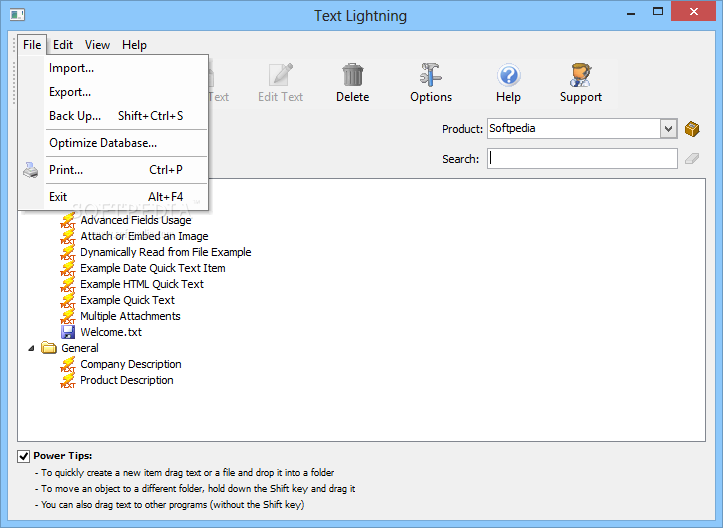
Text Lightning is a Microsoft Outlook add-in that enables you to clear your overflowing Inbox faster. Every message you send will be better written and more detailed than if you typed it yourself, because Text Lightning gives you instant access to the text you have used to reply to similar messages in the past.

You need only think of the best response to a question once and then reuse it whenever you are asked again.
Here are some key features of "Text Lightning":

One-Click Insertion of Text, Images and Files :
· All of the phrases and text snippets you commonly write in your messages can be added with a single click (plain text or formatted). The most relevant items are highlighted and any that do not match the current product or profile are hidden. You can also instantly add a selection of files, embedded images and formatted rich text.

Product Guessing:
· Specify a list of your products and their nicknames, and Text Lightning will determine which are mentioned in each message. With this it will personalize your responses and offer only relevant Quick Text

Never Type "Dear Tom" Again:
· When you reply to a message Text Lightning automatically starts the message with your preferred salutation using the recipient's name, e.g. "Hi John"

Customize your Text Templates with Fields:
· Use "Fields" in your Quick Text to specify text that changes by message, product or profile. E.g. %Message_Sender_First_Name% is automatically filled with the first name of the person you are replying to. %Product_Web_Page% is replaced with a clickable link to the web page of the relevant product. You can also use fields to attach files based on the date or insert conditional text, e.g. customize the message depending on whether the contact has purchased or not

One-Click Searching:
· With a single click you can search all your past responses to a message or contact

Quick Move:
· Archive messages to your favorite folder with a single click

Easy Copy:
· Isn't it frustrating trying to get the email of a message sender into the clipboard from Outlook? With Text Lightning it's available with a single click

Web Form Message Support:
· When Text Lightning replies to a message submitted from a web form it can read the sender name and address directly from fields in the message body. You can also use the fields to automatically customize your reply (insert relevant text or files, etc)

Forgotten Attachment Warning:
· Text Lightning will even warn you whenever you intended to attach a file but forgot to do so

Easy Importing and Exporting:
· Read quick text directly from folders of text files, Excel and CSV files. Drag and drop text (e.g. from Word or Outlook) and files to instantly create new Quick Text items. Also, a Setup Wizard is included to allow you to quickly get started

Integrate with Other Programs:
· Need to access data from other sources? Text Lightning can dynamically read text and HTML files, and also data from the Registry or an Ini file. You can also launch other programs directly from Outlook passing any required details

Requirements:

· Microsoft Outlook


What's New in This Release: · Added: Now supports Outlook 2010 (32 bit only)
· Added: New database engine
· Fixed: Problems searching for contacts containing ampersands
· Added: Quick selection of items in product list
· Changed: Now free
· Fixed: Permanent delete may not work
· Added: New option to auto focus message body after Quick Text insertion
· Added: Default font sizes for inserted HTML
· Added: Automatically checks for embedded HTTP references in HTML
· Fixed: Case and text issue when importing products
· Added: Can control whether TXL filters by products when text searching
· Added: New option to only search for one product per email
· Added: Now selects a Quick Text by default if it the subject matches the search text
· Added: Now remembers the Quick Text that we use for each search

DOWNLOAD

Kamis, 27 Januari 2011

Google Chrome 10.0.648.6 Dev

Just a day after releasing an update to the Beta Channel, Google is serving early adopters a new Build of Chrome 10.0.
The Mountain View-based search giant is pushing forward not only the Beta flavor of its open source browser but also the next major iteration of Chrome in parallel.

Google Chrome 10.0.648.6 Dev is now available to early adopters for testing (users will be able to find the download link at the bottom of this article).

The bits served through the Dev Channel are more advanced than Chrome 9.0 Beta, and in this sense, designed to be run in testing environments.

As with other pre-release software, the best course of action for users is to stick with the Stable Channel release, and not run the Beta or Dev milestones into production.

According to Google, Chrome 10.0.648.6 Dev is available for download on all supported platforms, Windows, Mac OS X and Linux.

But testers should not expect to see major changes in this release. Just as it is the case with the latest Beta Build, Chrome 10.0.648.6 Dev is designed to introduce a number of fixes, but no new features.

The Mountain View-based company revealed that it has resolved a number of stability issues identified in the previous Dev Channel update. In this regard, early adopters that have already been testing Chrome 10.0 are bound to notice a boost in reliability.

The previous Dev Channel update for Chrome was introduced a week ago, and it delivered more consistent modifications.

Google revealed at the time that it has updated the V8 JavaScript engine, kicked up a notch the new tabbed preferences dialog, tweaked Instant search, and added options to the context menu of PDFs in frames.

It won’t be long now until Chrome 9.0 graduates to the Stable Channel, inherently pushing Chrome 10.0 to Beta, and Chrome 11.0 to Dev.

Google Chrome for Windows is available for download here.

Google Chrome for Linux is available for
download here.

Google Chrome for Mac is available for
download here.

Follow the editor on Twitter @mariusoiaga

Sabtu, 22 Januari 2011

Adobe Flash Player 10

This high-performance client runtime is a must on any computer.


The Adobe Flash Platform is an integrated set of technologies surrounded by an established ecosystem of support programs, business partners, and enthusiastic user communities. This powerful piece of software will prove to be a valuable asset on any computer, regardless your operating system.


Here are some key features of "Adobe Flash Player":


3D effects:
Create more intuitive, engaging interfaces using built-in support for 3D effects. Get started quickly without being a 3D master by designing in 2D and easily transforming and animating in 3D. Fast, extremely lightweight, and simple-to-use APIs, along with 3D tools in Adobe Flash CS4 Professional software, make motion that was previously accessible only to expert users via ActionScript language or custom third-party libraries available to everyone.


Custom filters and effects:
Create high-performance, real-time effects for cinematic experiences that quickly engage users. With new Adobe Pixel Bender™, the same technology behind many filters and effects in Adobe After Effects® software, these dynamic and interactive effects can be used both in production with After Effects CS4 and live with Flash Player 10. The Pixel Bender just-in- time (JIT) compiler can also be used to process other types of data, such as sound or mathematical functions, asynchronously in a separate thread.


Advanced text support:
Take advantage of a new, flexible text engine that brings print-quality publishing to the web, building on more than 25 years of Adobe expertise in typography. Gain more control over text layout using the Text Layout Framework, an extensible library built on the new text engine in Adobe Flash Player 10, which delivers advanced, easy-to-integrate typographic and text layout features for rich, sophisticated and innovative typography on the web. Create multilingual web applications using device fonts that can now be anti-aliased, rotated, and styled, or build your own unique text components.


Dynamic sound generation:
Use enhanced sound APIs to dynamically generate audio and create new types of audio applications such as music mixers and sequencers, real-time audio for games, and even audio visualizers. Work with loaded MP3 audio at a lower level by extracting audio data and supplying it to the sound buffer. Process, filter, and mix audio in real time through the Pixel Bender JIT compiler to extend creative freedom beyond the visual experience.


Drawing API Enhanced:
Perform runtime drawing more easily with restyleable properties, 3D APIs, and a new way of drawing sophisticated shapes without having to code them line by line. Developers can tweak parts of curves, change styling, replace parts, and use custom filters and effects, delivering improved throughput, creative control, and greater productivity. Enhancements to the Drawing API add the z dimension, real perspective, textured meshes in 3D space, a retained graphics model, read/write rendering, and triangle drawing with UV coordinates, while adding memory and improving performance.


Hardware acceleration:
Use the hardware processing power of the graphics card to paint SWF files into the browser and accelerate compositing calculations of bitmaps, filters, blend modes, and video overlays faster than would be performed in software.


Vector data type:
Use the new typed array class for better performance, efficiency, and error checking of data.


Dynamic Streaming:
Show exceptional video with streams that automatically adjust to changing network conditions. Leverage new quality-of-service metrics to provide a better streaming experience.


Speex audio codec:
Take advantage of the new, high-fidelity and open source Speex voice codec, which offers a low-latency alternative for voice encoding. Flash Player also supports ADPCM, HE-AAC, MP3, and Nellymoser audio.


File upload and download APIs:
Bring users into the experience by letting them load and save files from your web application. New file reference runtime access allows local processing of data without roundtripping to the server.


Color correction:
Deliver web applications with accurate color, so your favorite web destinations look the way they were intended. Color correction works with the monitor's ICC color profile and allows you to convert SWF files to standard RGB.
Requirements:


· OS: Windows XP/NT/2003/Vista/7
· CPU: Intel PentiumII 450MHz/ AMD Athlon 600MHz or faster
· RAM: 128 MB


DOWNLOAD

Rabu, 19 Januari 2011

Multi Screen Web Browser 1.1.0.2

A simple web browser.


Multi Screen Web Browser is a simple, easy to use application specially designed to help you view your webpages in an original way.


It was designed to allow users to view multiple status / monitoring pages at the same time, providing an overview of a systems health. It could just as easily be used to watch multiple stocks or currencies.
Here are some key features of "Multi Screen Web Browser":


· Build lists of web pages you wish to load.
· Save and Load Lists.
· Configure the number of screens to display.
· Screen Scroll – If more sites are in a list than screen available, screen scrolling can be enabled to rotate through all the sites.
· 2 screen display modes – All Small screens or 1 large screen and remainder small.
· Full screen mode (maximises the window and hides all tool bares and status bars
· Refresh all or 1 site
· Independent browser page with favourites feature (used to pre-login to secure sites before starting refresh).
· Tabbed pages for individual page displays.
· Snapshot Capture – Capture images of individual or all screens.
· Pages auto-refresh every 5 minutes.


Requirements:


· NET Framework 3.5


DOWNLOAD

Senin, 17 Januari 2011

Utilu Mozilla Firefox Collection 1.0.2.6

Contains multiple standalone versions of Mozilla Firefox plus Firebug and Web Developer add-ons


Utilu Mozilla Firefox Collection is a utility that contains multiple versions of the free web browser Mozilla Firefox, which are standalone so they can be used at the same time. In Utilu Mozilla Firefox Collection  you can quickly see how your websites look when rendered using different versions of the Gecko render engine.


You can specify the filenames or locations (URLs) to open in all installed versions of Mozilla Firefox. The version number of each included version of Mozilla Firefox can be found in the titlebar. Utilu Mozilla Firefox Collection also includes the Firebug and Web Developer add-ons for all included versions of Mozilla Firefox. These add-ons provide a variety of tools which make troubleshooting websites much easier. Get Utilu Mozilla Firefox Collection and take it for a spin to see what it can actually do for you!
Here are some key features of "Utilu Mozilla Firefox Collection":


· It can open one or more local files and/or URLs in all installed versions of Mozilla Firefox with a single click
· It can appear in the context menu of Windows Explorer, so a file can be opened in every installed version of Mozilla Firefox directly
· It can display the version number of Mozilla Firefox in the titlebar
· It includes a number of window resizing options for the Web Developer add-on, settings for all common resolutions like 800x600, 1024x768, 1280x1024, 1440x900 and 1600x1200 are included
· It can be installed for all users, so it’s available for everyone
· It can be installed and used silently, it’s possible to create an unattended installation and use all functions using command line parameters
· It even works under the most restricted user accounts after installation, only the installation needs to be done by someone with Administrator privileges


What's New in This Release:


· Updated Mozilla Firefox from 4.0.0.0 beta 8 to 4.0.0.0 beta 9
· Updated Firebug from 1.6.0 to 1.6.1
· Updated Web Developer from 1.1.8 to 1.1.9
· Minor changes and improvements


DOWNLOAD

Selasa, 11 Januari 2011

Master Password+ 1.9.20110108

A Firefox extension that adds new / improved features to the built-in Master Password


Master Password+ is a powerful add-on designed to enhance the master password feature of Firefox.


This extension adds the following new/improved features to built-in Master Password interface:
· Set timeout directly from "Change Master Password" window
· Toolbar, addressbar and statusbar icons
· Icons in tools menu and context menu
· Icons are dynamic and represent current state of master password, such as locked/unlocked or unset
· Options to hide the icons and/or menu items
· Mouse wheel now not ignored and resets the countdown
· Timer can now be set to ignore user activity (will not reset itself if user is using browser)
· Hotkey to lock/unlock master password (ALT + L)
· Ability to enable or disable timeout
· Easy access to options or set/change master password via right click on toolbar/statusbar icons or tools menu
· Option to prompt master password on startup (work around for Bug 536140 which prompts multiple times for master password on startup).
· Option to suppress all or duplicate master password prompt popups
· Audio and icon blinking notifications when master password prompt was suppressed
Requirements:


· Firefox 3.0 - 4.0b9pre
· Thunderbird 3.0 - 3.1.*


What's New in This Release:


· Added: lock application - will prevent using the application until unlocked. (either use CTRL+SHIFT+L or via right click on icon)
· Fixed: "Exit if canceled" can be bypassed when open second window
· Fixed: removing MP when "notification" icon activated would not change icon to the correct state


DOWNLOAD

Firefox 4.0 Beta 8 / 3.7 Alpha 5 / 3.6.13

The browser provides virus, popup and spyware protection in a simple, easy to use tabbed interface


The Firefox project (formerly Firebird, which was formerly Phoenix) is a redesign of Mozilla's browser component, written using the XUL user interface language and designed to be cross-platform.


Firefox is a small, fast and very easy to use browser that offers many advantages over other web browsers, such as the ability to block pop-up windows and the tabbed browsing.
Here are some key features of "Firefox":


· Comprehensive popup controls to keep unwanted advertising off your desktop;
· A tab browsing mode that lets you open several pages in a single window, allowing you to load links in the background without leaving the page you're on;
· Integrated search (powered by Google);
· Industry leading accessibility with Find As You Type - find links and page text by simply typing;
· Simplified privacy controls that let you cover your tracks more effectively;
· A streamlined browser window that lets you see more of the page than any other browser while at the same time being more configurable;
· A large variety of free downloadable extensions and themes that add specific functionality and visual changes to the browser.


Requirements:


· Pentium 233 MHz (Recommended: Pentium 500MHz or greater)
· 64 MB RAM (Recommended: 128 MB RAM or greater)
· 52 MB hard drive space


What's New in This Release:


· The Firefox Sync setup experience has been greatly improved across desktop and mobile devices
· Speed, functionality, and compatibility improvements to WebGL
· Additional polish for the Firefox Add-ons Manager


DOWNLOAD

Mozilla Thunderbird 3.3 Alpha 1 / 3.1.7 / 3.0.11 / 2.0.0.24 / 1.5.0.14

Email client with tabs, great search, and email archiving


Mozilla Thunderbird is an open-source and cross-platform mail client and news reader for most modern operating systems including, but not limited to Windows, Macintosh and Linux.


It offers some advantages over other mail clients, including junk mail classification. Built from Mozilla code, Mozilla Thunderbird uses Gecko, the most standards-compliant rendering engine in existence.


In addition to the feature set found in Mozilla Mail, Thunderbird has several new features and improvements to make your mail and new experience better.


Note: You must delete your old Mozilla Thunderbird directory rather than just overwriting the files there. Not doing so WILL result in problems and you should not file any bugs on Mozilla Thunderbird unless you've first done a clean install. Also please be aware that Thunderbird 3.0.x will be maintained with security and stability updates for a short period of time. All users are strongly encouraged to upgrade to Thunderbird 3.1.
Here are some key features of "Mozilla Thunderbird":


Full-Featured Email:
· Simple to use, powerful, and customizable, Thunderbird is a full-featured email application. Thunderbird supports IMAP and POP mail protocols, as well as HTML mail formatting. Easily import your existing email accounts and messages. Built-in RSS capabilities, powerful quick search, spell check as you type, global inbox, deleting attachments and advanced message filtering round out Thunderbird's modern feature set.


Junk Mail Filters:
· Each email you receive passes through Thunderbird's leading-edge junk mail filters. Each time you mark messages as spam, Thunderbird improves its filtering so you can spend more time reading the mail that matters. Thunderbird will also use your mail provider's spam filters to keep junk mail out of your inbox.


Anti-Phishing Protection:
· Thunderbird protects you from increasingly common email scams "also known as “phishing” which try to fool you into handing over your passwords and other personal information. Thunderbird will tell you when it thinks a message might be a scam.


Advanced Security:
· Thunderbird provides enterprise and government grade security features including S/MIME, digital signing, message encryption, support for certificates and security devices. Attachments are never run without your express permission, protecting you from many worms and viruses.


Automatic Updates:
· The new Software Update feature makes it easy to get the latest security and feature updates to Thunderbird. Thunderbird automatically downloads these small updates in the background and prompts you when they are ready to be installed.


Customize Thunderbird:
· Select new button controls for your toolbars, install extensions to add new features, or change the look of your browser with themes the way Thunderbird looks and works is under your control.


Requirements:


· Pentium 233 MHz (Recommended: Pentium 500MHz or greater)
· Windows 7, Windows Vista, Windows XP: 786 MB RAM (Recommended: 1GB RAM or greater)
· Windows 2000: 256 MB RAM (Recommended: 512 MB RAM or greater)
· 52 MB hard drive space


What's New in This Release:


· Several fixes to improve handling of large folder files stored locally.
· Several fixes to improve corruption in local copy of IMAP mailboxes.
· Add support for OTS font sanitizer
· Buffer overflow while line breaking after document.write with long string
· Miscellaneous memory safety hazards (rv:1.9.2.13/ 1.9.1.16)


DOWNLOAD

Kamis, 06 Januari 2011

TwitterBackup 3.1.5

A tool that downloads all your tweets and stores them in XML format.


Are you worried about losing your Twitter tweets? Fear no more, because TwitterBackup will easily connect and backup all your tweets with a single mouse click.


Requirements:


· Java


DOWNLOAD

Complete Internet Repair 0.9.5.955

Attempts to repair everything Internet related


We are living in an Internet age and with any widely used technologies, come a new set of problems. Complete Internet Repair is a handy utility designed to solve these Internet problems as they arrive.


Complete Internet Repair does exactly what it says. It attempts to repair everything internet related, including networking problems. With any repair utility, you will need to remember only two golden rules.


Firstly; don’t try and repair something that is not broken, you might break it. Secondly; the utility can’t repair it all, we are not like the all-seeing and all-knowing Oracle, we cannot anticipate each and every situation, but this all said, this utility should be able to help with most situations. Rizone Complete Internet Repair is basically a combination of Internet Recovery KIT and Winsock Repair.


It could help if you are experiencing any of the following problems:
· Internet or network problem after removing adware, spyware, virus, worm, Trojan horse, etc.
· Loss network connection after installing/uninstalling adware, spyware, antispam, vpn, firewall or other networking programs.
· Unable to access any webpage or can only access some webpages.
· Pop-up error window with network related problem description.
· No network connectivity due to registry errors.
· DNS lookup problem.
· Fail to renew the network adapter’s IP address or other DHCP errors.
· Network connectivity issue with limited or no connections message.
· Windows update does not work
· You are having problems connecting to secured websites (ex. Banking).
· Internet Explorer stopped working or crashes all the time.
· Other networking problems.
What's New in This Release:


· Update: The exe can now be renamed.
· Update: Some minor bug fixes.


DOWNLOAD

.NET Framework 2.0 Service Pack 2 / 2.0 / 1.1

Provides the latest updates to the .NET Framework


Microsoft .NET Framework is the programming model of the .NET environment for building, deploying, and running Web-based applications, smart client applications, and XML Web services.


It manages much of the plumbing, enabling developers to focus on writing the business logic code for their applications.


The .NET Framework includes the common language runtime and class libraries.


The Microsoft .NET Framework version 2.0 redistributable package installs the .NET Framework runtime and associated files required to run applications developed to target the .NET Framework 2.0.


The .NET Framework version 2.0 improves scalability and performance of applications with improved caching, application deployment and updating with ClickOnce, support for the broadest array of browsers and devices with ASP.NET 2.0 controls and services.


Important: You cannot install two different language versions of the .NET Framework on the same machine. Attempting to install a second language version of the .NET Framework will cause the following error to appear: "Setup cannot install Microsoft .NET Framework because another version of the product is already installed." If you are targeting a non-English platform or if you wish to view .NET Framework resources in a different language, you must download the appropriate language version of the .NET Framework language pack


Requirements:


· Windows Installer 3.0 (except for Windows 98/ME, which require Windows Installer 2.0 or later). Windows Installer 3.1 or later is recommended.
· IE 5.01 or later: You must also be running Microsoft Internet Explorer 5.01 or later for all installations of the .NET Framework.
· Disk Space Requirements: 280 MB (x86), 610 MB (x64)


Microsoft .NET Framework 2.0 Service Pack 1 Language Packs contain translated text, such as error messages, for languages other than English. Without the installation of a Language Pack, these messages are displayed in English by default.


Multiple language packs, each for a different language, can be installed on a single computer. Microsoft .NET Framework 2.0 SP1 Language Packs contain translated text, such as error messages, for each language.


DOWNLOAD  2.0 SP2 86x
                         2.0 SP2 64x
                         1.1 SP1 

Selasa, 28 Desember 2010

Y! Multi Messenger 8.x and 9.x ( PC application )


Y! Multi Messenger allows you to run multiple instances of Yahoo! Messenger instead of only keeping one open.

This is perfect for those who run under several names. There are others out like this...but have an "update prompt", this does NOT have that!

Yahoo! Messenger for Vista:

We currently do not have a compatible version of YMulti Messenger for the newest Yahoo Messenger for Windows Vista!

Y!Multi v8 and v9 Instructions:

The version 8 patching program is NOT version specific, it will work with all versions of YM 8! All you need to do is launch the Y!Multi Messenger.exe file and then you can select to enable or disable the polygamy patch. Once its patched (either way) it will remain that way until changed again. The only time you will now use the Y!Multi Messenger.exe file is to change the actual patching, otherwise, you will now use the normal Yahoo Messenger icons.


Installation Instructions:

Before installing, please read ALL included documentation! Run the installation setup program to install Y!Multi Messenger. This will automatically install to C:Program FilesYahoo!Messenger. If you have installed Yahoo Messenger to a different folder, make sure to reflect the correct path in the Y!Multi Messenger setup wizard. Failure to have it install to the Yahoo Messenger program files folder will likely result in dll (driver file) errors.

Up/Downgrading Instructions:

Should you upgrade or downgrade versions of Yahoo Messenger, please delete the Y!Multi Messenger.exe file from the Yahoo program files folder first, then uninstall/upgrade Yahoo Messenger. Then if you are wanting to install Multi, make sure you have the same version of it and install it. It is important to delete the Y!Multi Messenger.exe file before up/down grading it as sometimes it may not get overwritten and can cause errors!


DOWNLOAD

Senin, 27 Desember 2010

Firefox 4.0 Beta 8 ( PC application )

The Firefox project (formerly Firebird, which was formerly Phoenix) is a redesign of Mozilla's browser component, written using the XUL user interface language and designed to be cross-platform.

Firefox is a small, fast and very easy to use browser that offers many advantages over other web browsers, such as the ability to block pop-up windows and the tabbed browsing.
Here are some key features of "Firefox":

· Comprehensive popup controls to keep unwanted advertising off your desktop;
· A tab browsing mode that lets you open several pages in a single window, allowing you to load links in the background without leaving the page you're on;
· Integrated search (powered by Google);
· Industry leading accessibility with Find As You Type - find links and page text by simply typing;
· Simplified privacy controls that let you cover your tracks more effectively;
· A streamlined browser window that lets you see more of the page than any other browser while at the same time being more configurable;
· A large variety of free downloadable extensions and themes that add specific functionality and visual changes to the browser.

Requirements:
· Pentium 233 MHz (Recommended: Pentium 500MHz or greater)
· 64 MB RAM (Recommended: 128 MB RAM or greater)
· 52 MB hard drive space

What's New in This Release:
· The Firefox Sync setup experience has been greatly improved across desktop and mobile devices
· Speed, functionality, and compatibility improvements to WebGL
· Additional polish for the Firefox Add-ons Manager

DOWNLOAD

Google Chrome 5.0.375.3 Dev - Offline Installer ( PC application )

Browser Chromehas now released a new version: Google Chrome 5.0.375.3 Dev. There were several changes made to improve the performance of chrome. One of the most prominent changes in Google Chrome 5.0.375.3 Flash Dev is now enabled by default.

Google Chrome is a browser from Google is designed to open the site faster, easier and comes with a minimalist design and interesting. Google Chrome is also light as used and have many good fiture 

Google Chrome 5.0.375.3 Dev That is the alternative the great giant Google Offers to web browsing compared to existing( Internet Explorer, Firefox, Opera or Safari ), as Strengths acres Providing simplicity both in installation and use, reliability and speed.

At first Glance, Which highlights its minimalist interface does not find elements That Were Used as the menus, and allows faster use of the browser. Google Chrome 5.0.375.3 is focused on Dev what really matters: in navigation, and avoiding superfluous features allowing quick access to any Internet site.

Another key point for users is customary That Can your browser to any content available on the network, of any kind whatsoever, and behave in a stable manner. To this end, the Google team has created a system of separate tabs, so That's an error in one of Them does not affect the navigation of the rest.


The Dev channel has been updated to 5.0.375.3 for Windows:
  • Flash enabled by default
  • Implement Exceptions setting patterns for content.
  • A nicer looking video scaling algorithm is now Used